Modbus devices support two kinds of ordinalized data groups.
See the following subsections for more information:
Blocks must be defined for every valid data group ordinal. Data group ordinals must correspond to the range defined by the combination of baseOrd and maxCnt attributes. Best practice recommends that you always define the maxCnt attribute. If maxCnt is left undefined, regNum or regNum + ordIncrement attributes must be used to define your ordinalized data groups. The regNum_ord# attribute is illogical if used in conjunction with an undefined maxCnt.
To Define Data Group Ordinal Blocks with regNum
Use the regNum attribute when there is only one data group ordinal, or when one register supplies data to all data group ordinals.
Example
The single data group begins reading at register 9501 and reads for 5 registers: 9501, 9502, 9503, 9504, and 9505. In this example, each register included supplies data to a separate data group element.
|
<modbusReadBlocks> <block1 regNum="9501" regCnt="5" funcCode="3" regOff="0" regByteLen="4"/> </modbusReadBlocks> |
To Define Data Group Ordinal Blocks with regNum_ord#
Use the regNum_ord# attribute to specify the data group ordinal number and corresponding starting register for that ordinal. Optionally, use regNum + ordIncrement. regNum_ord# never pairs with regNum or ordIncrement.
Example
maxCnt="2" indicates that two instances of a data group are required. For the data group assigned ordinal 1, the data is retrieved from registers 9501-9504. For the data group assigned ordinal 2, the data is retrieved from registers 9701-9704.
|
<modbusReadBlocks> <block1 regCnt="4" funcCode="3" regNum_ord1="9501"regNum_ord2="9701" regOff="0" regByteLen="2"/> </modbusReadBlocks> |
To Define Data Group Ordinal Blocks with regNum + ordIncrement
Use the regNum + ordIncrement attributes to establish a starting register number and then to define the increments of groups of registers that correspond to data group ordinals. ordIncrement must be a static number. Optionally, use regNum_ord#. ordIncrement always depends on regNum, but regNum does not depend on ordIncrement.
Example
The first ordinalized data group begins at register 9501 and proceeds in incremental groups of 22 registers per data group ordinal. Ordinal 1 reads from 9501 to 9522, ordinal 2 reads from 9523 to 9544, ordinal 3 reads from 9545 to 9566, and so on.
|
<modbusReadBlocks regByteLen="4"> <block1 regNum="9501"ordIncrement="22" regCnt="22" funcCode="3"/> </modbusReadBlocks> |
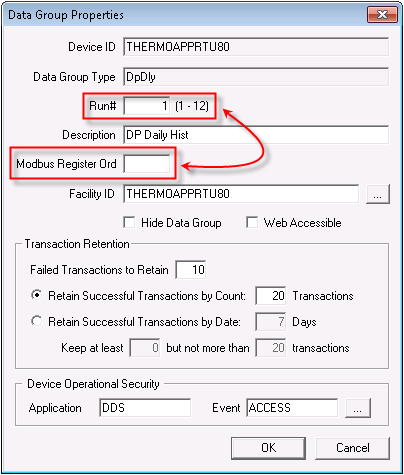
Modbus-based EIEs include several data groups whose Data Group Properties dialog box includes both a data group ordinal field (for example, Run# in the image below) and a Modbus Register Ord field. The data group ordinal field can be used to ordinalize a data group in a number of ways; in the image below, it associates a data group with its respective meter run. The Modbus Register Ord field associates a data group with its respective registers as they are defined within a device template file. The Modbus Register Ord field applies to any ordinalized data group that includes Modbus register information. This will exclude all FMS data groups.
You must assign the data group a data group ordinal. However, the data group might or might not need to be assigned a Modbus Register Ord number. If the data group ordinal for a data group is not the same as the Modbus register ordinal that represents the source of the data group's data, specify a Modbus Register Ord value. Otherwise, leave Modbus Register Ord blank to default to the value assigned to the data group ordinal.
See also modbusReadBlocks, modbusWriteBlocks.
Example
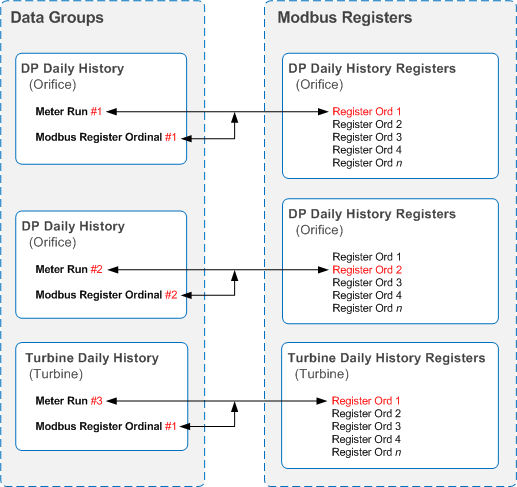
Imagine you have 3 meter runs. Meter run 1 has a Run# value of "1," Meter run 2 has a Run# value of "2," Meter run 3 has a Run# value of "3." Meter runs 1 and 2 are orifice. Meter run 3 is turbine. Each meter run requires its own daily history data group, which means that the register locations corresponding to each data group vary. However, meter runs 1 and 2 are orifice, so their daily history registers are in close proximity to one another. Meter run 3 is turbine, so its daily history registers are not near those of an orifice meter.
Map meter run 1 to the first register ordinal used for orifice meter daily history. Map meter run 2 to the second register ordinal used for orifice meter daily history. Map meter run 3 to the first register ordinal used for turbine meter daily history however, because turbine daily history registers are in a different register area than orifice daily history registers. So meter run 3 would require you to enter "1" in its Modbus Register Ord field, not "3."
The following diagram illustrates the example described above:
See also your sample Modbus template file for applied examples.
To Hide the Modbus Register Ord Field
For several Modbus devices (for example, Realflo, Omni, Prosoft, Micro1c), the registers for meter-based data are organized strictly by meter number. Therefore when the ordinal number in CygNet represents a meter number, it will always be the same as the block ordinal. Because the values are always the same, use the showBlockOrd attribute to hide the Modbus Register Ord field in the Data Group Properties dialog box. See showBlockOrd.
Example
|
<dataGroups udcCat="~UDCALL" canRecv="true" canSend="false" uccRecv="true" uccSend="false" udcDefFac="true" devDG="false" baseOrd="0" maxCnt="1" ordLabel="Run#" showBlockOrd="false"> |
Contrast that with Thermo devices, where registers are organized first by meter type, then instance (for example, the first orifice meter or the first turbine meter). In this case, while the ordinal number in CygNet represents a meter number, the block ordinal reflects the instance within a meter type (for example, meter 1 may be the first orifice meter, while meter 2 may be the first turbine meter).
If not included in the template file, the showBlockOrd attribute defaults to "true" to show the Modbus Register Ord field.

|
|
|

